




What Are VoIP Phones for Business?
VoIP (Voice over Internet Protocol) lets you make and receive calls using the internet instead of traditional phone lines. When we talk about VoIP phones for business, we mean a complete communication system that includes:- Desk phones: familiar hardware with color screens and programmable keys
- Mobile apps: turn any smartphone into an office extension
- Computer softphones: call directly from your laptop with a headset
What Makes VoIP Different from Traditional Phone Systems?
| Feature | Traditional Telecom | VoIP Phones for Business |
|---|---|---|
| Network type | PSTN (phone network) | Internet Protocol (IP) |
| Hardware needs | On-site PBX, separate lines | IP phones, softphones, or adapters |
| Scalability | Add physical lines and ports | Add software licenses or virtual extensions |
| Call costs | Per-minute, especially long distance | Mostly flat rate, includes long distance |
| Maintenance | Regular technician visits | Remote updates, vendor-managed |
| Mobility | Fixed desk phones | Works anywhere with broadband or Wi-Fi |
| Additional features | Basic call forwarding, voicemail | Video conferencing, instant messaging, CRM integration |
Key Benefits of VoIP Phones for Business Operations
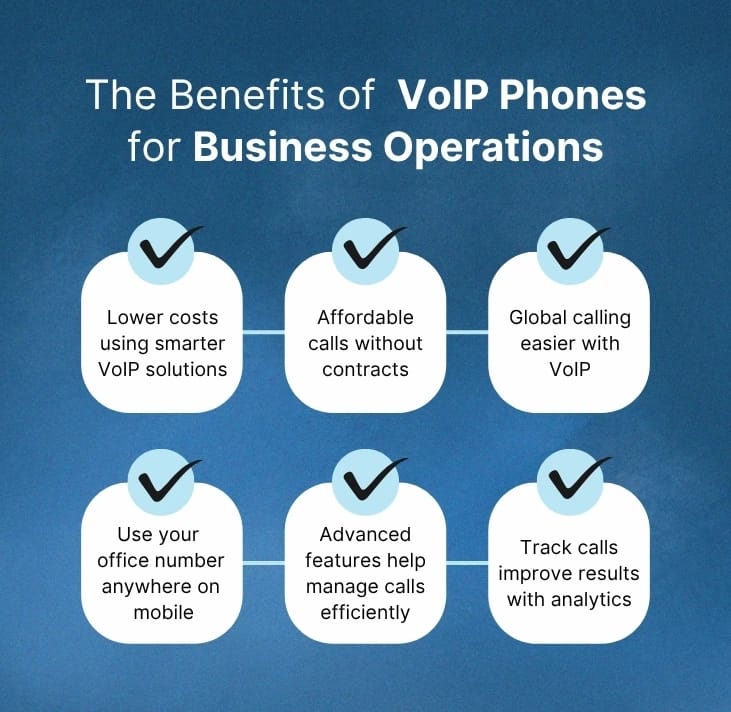
1. Lower Costs
- No line rental, call charges, or maintenance contracts
- Monthly per-user fee includes unlimited local and long-distance calling
- International calls at a fraction of traditional rates
2. Easy Management
- Add or remove users via a web portal, no on-site technician
- New extension works instantly; removal takes one click
- Automatic system updates from the provider
3. Scalable
- Same platform works for 5 or 500 employees
- Pay only for what you use
- Add temporary licenses for seasonal peaks, reduce when slow
4. Mobility and Remote Work
- Use office extension from anywhere (train, home, etc.)
- Mobile app plus headset equals full functionality
- Caller never knows the difference
- Perfect for hybrid work models
5. Rich Features
- Auto attendants, call queues, voicemail-to-email
- Call recording and analytics
- CRM integration, see caller info before answering
- Boosts efficiency and customer satisfaction
Common Business Problems VoIP Solves
| Problem | How VoIP Solves It | Real-World Impact |
|---|---|---|
| Missed calls after hours | Time-based routing sends calls to a mobile or voicemail | Zero abandoned leads |
| Long hold times | Callback requests – “Press 1 to keep your place, we’ll call you back” | Customer satisfaction up 40% |
| No call tracking | Analytics dashboard shows wait times, abandon rates, agent performance | Data-driven staffing decisions |
| Poor rural call quality | Dynamic routing – calls automatically avoid congested internet paths | Clear audio even at 5 Mbps |
Internet Requirements for VoIP
Bandwidth
1 Mbps per active call. For 10 simultaneous calls, you need 10 Mbps dedicated to voice. Most business broadband (100+ Mbps) is fine.Connection Type
Wired Ethernet for desk phones. Wi-Fi works but can introduce jitter. If you must use Wi-Fi, use 5 GHz and keep the phone close to the router.Quality of Service (QoS)
Configure your router to prioritize VoIP packets over web browsing and video streaming. Most modern routers have a “VoIP QoS” toggle. No QoS? Many providers offer a free router or pre-configured hardware.VoIP Setup Process for Businesses
Number Porting
Keep your existing business phone number. Most providers handle the transfer. Process takes 7–14 days, during which your old service remains active. No downtime.System Configuration
Log into the provider’s web portal. Set up:- Call flows (ring groups, time-of-day routing)
- IVR menus
- Extension lists
- Voicemail greetings
Staff Onboarding
Train your team on new features:- How to transfer calls (warm vs blind)
- Using mobile apps
- Accessing voicemail and recordings
How to Choose the Right VoIP System, 5-Step Checklist
1. Call Quality & Uptime
Read independent reviews on G2, Trustpilot, or Reddit. Ask for a 14-day free trial. Make 50 test calls during peak hours.2. Features in Your Price Tier
Avoid bait-and-switch. Ask: “Is call recording included in the base plan?” “What about auto attendants?” Get it in writing.3. Ease of Administration
Ask for a demo of the admin portal. Can you add a user in under 3 minutes? Change a call flow without support?4. CRM & Tool Integrations
Does it work with Salesforce, HubSpot, Zoho, or Microsoft Teams? Native integration (not just copy-paste) saves hours per week.5. Customer Support
Test their support before buying. Call at 9 PM on a Sunday. Is 24/7 phone support real? Average response time under 2 minutes?Types of VoIP Providers, Which Fits You?
| Provider Type | Best For | Example | Pros | Cons |
|---|---|---|---|---|
| All-in-one (RingCentral, Nextiva) | Small to medium businesses | RC, Nextiva | Everything included, great support | Higher per-user price |
| DIY (Twilio, Telnyx) | Tech-savvy teams, developers | Twilio Elastic SIP | Lowest cost, full control | Requires technical staff |
| UCaaS (Microsoft Teams, Zoom Phone) | Teams already using collaboration tools | Zoom Phone | Single app for chat, meetings, phone | Phone features less advanced |
| Budget (Vonage, Ooma) | Very small teams, low call volume | Ooma Office | Cheap ($15-$20) | Limited support, fewer features |
Troubleshooting Common VoIP Issues
| Issue | Most Likely Cause | Fix |
|---|---|---|
| Choppy audio | Not enough bandwidth or Wi-Fi interference | Use Ethernet, enable QoS, close other apps |
| One-way audio (you hear them, they don’t hear you) | Firewall blocking RTP ports | Whitelist provider’s IP ranges (support can help) |
| Calls drop after exactly 30 minutes | Session timer issue | Provider can adjust SIP timing |
| Echo | Acoustic feedback from speakerphone | Lower volume, use headset, enable echo cancellation in portal |
Why Businesses Trust Almens Consult for Their VoIP Phone System
Almens Consult specialises in guiding businesses through this process. They assess your current setup, understand your call patterns, and recommend a tailored VoIP solution. Their team handles the technical migration, including number porting, network configuration, and user training. They also provide ongoing support to resolve any issues quickly. Whether you run a five-person office or a multi-site enterprise, Almens Consult reduces the risk and effort of moving to voip phones for business. Their expertise ensures you get the right system at the right price, with no hidden costs or unexpected downtime.
Future of VoIP and Business Communication
VoIP hosted phones systems for businesses will continue to evolve with:
- AI-powered call routing: predict why a customer is calling and route them to the best agent automatically
- Advanced analytics: sentiment analysis (detect angry callers), real-time coaching suggestions
- Deeper CRM integration: screen pop-ups with customer history, suggested next actions
- Fully remote communication systems: no physical office required at all
Businesses that adopt early gain a strong competitive advantage in customer service and operational agility.
FAQs
Typically $15–$30 per user per month for standard plans. Enterprise plans with advanced features run $30–$50. That’s 50–75% less than traditional PBX systems.
Yes. Most providers offer number porting. The process takes 7–14 days with no downtime.
1 Mbps per active call. For 10 simultaneous calls, you need 10 Mbps dedicated to voice. Most business broadband exceeds this.
Yes, when properly configured. Look for TLS/SRTP encryption. For regulated industries such as healthcare or finance, choose providers with compliance features.
Yes. UCaaS providers like Zoom Phone and Microsoft Teams Voice integrate directly. You can also connect via SIP Gateway.
Most providers offer call forwarding to mobile numbers or automatic failover to PSTN. Some include cellular backup.